
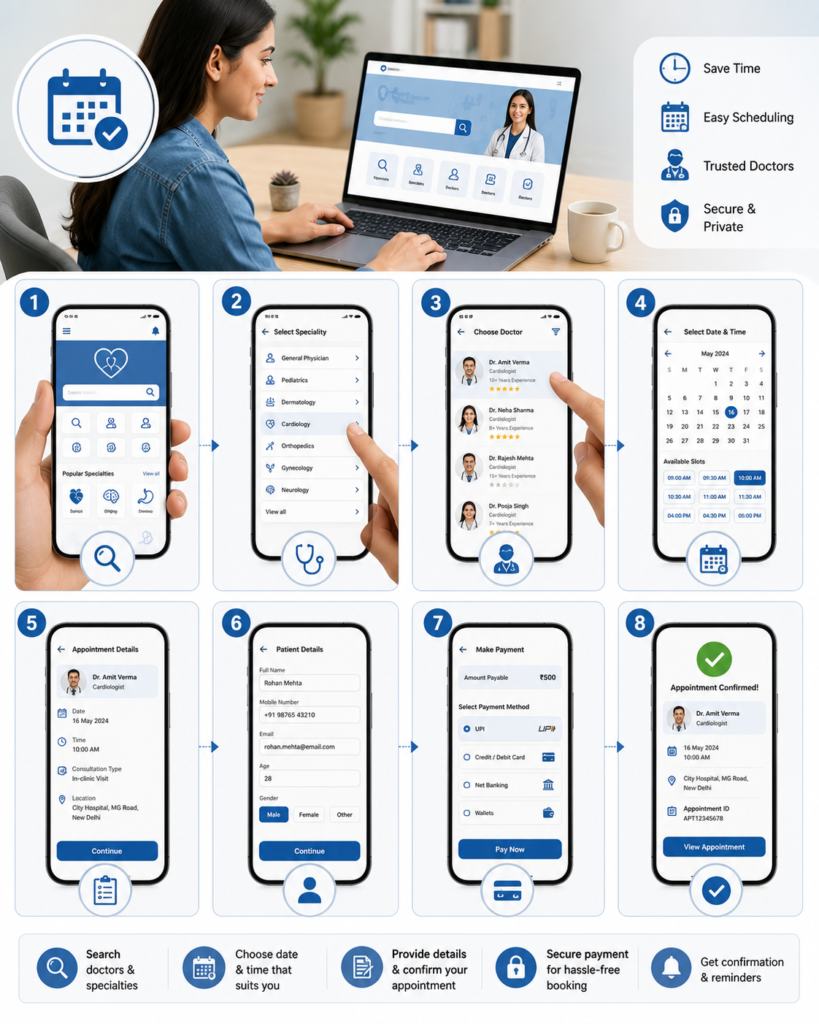
How to Book a Doctor Appointment Online: A Complete Patient Guide
Online doctor appointment booking has made healthcare more convenient than ever. Instead of waiting in long queues or making multiple phone calls, patients can schedule consultations with healthcare professionals from the comfort of their homes. Whether you need a routine health checkup, specialist consultation, or follow-up visit, online appointment booking saves time and simplifies the process.
This guide explains how to book a doctor appointment online, its benefits, what information you’ll need, and tips for a smooth healthcare experience.
What Is Online Doctor Appointment Booking?
Online doctor appointment booking is a digital system that allows patients to schedule medical consultations through a hospital or clinic website, mobile application, or healthcare portal.
Patients can often:
- Choose a doctor
- Select a specialty
- Pick a preferred date and time
- Provide basic patient information
- Receive appointment confirmation
Many healthcare providers also offer options for in-person and virtual consultations.
Benefits of Booking a Doctor Appointment Online
Online appointment scheduling offers several advantages:
- Saves time and effort
- Available 24/7
- Reduces waiting time at healthcare facilities
- Convenient appointment selection
- Easy access to specialist consultations
- Appointment reminders
- Better management of follow-up visits
- Secure digital records in many systems
Online booking improves convenience for both patients and healthcare providers.
When Should You Book a Doctor Appointment?
Consider scheduling an appointment if you experience:
- Persistent fever
- Ongoing cough
- Shortness of breath
- Chest discomfort
- Severe headaches
- Unexplained weight loss
- Digestive problems
- Skin rashes
- Joint pain
- Routine preventive health checkups
- Follow-up after previous treatment
- Management of chronic medical conditions
Early medical consultation often leads to better treatment outcomes.
Step-by-Step Guide to Booking a Doctor Appointment Online
Step 1: Visit the Healthcare Provider’s Website or App
Go to the official website or mobile application of the hospital, clinic, or healthcare provider offering online appointments.
Always use trusted and secure platforms.
Step 2: Select the Medical Specialty
Choose the department that matches your healthcare needs.
Examples include:
- General Medicine
- Cardiology
- Orthopedics
- Dermatology
- Pediatrics
- Gynecology
- Neurology
- ENT
- Gastroenterology
- Pulmonology
Selecting the correct specialty helps ensure appropriate care.
Step 3: Choose Your Doctor
Some booking systems allow you to:
- Select a preferred doctor
- View available consultation timings
- Choose based on specialty
- Schedule follow-up appointments with the same physician
Choose the option that best fits your healthcare needs.
Step 4: Select a Date and Time
Pick an available appointment slot that is convenient for you.
Many online systems display real-time availability, making scheduling easier.
Step 5: Enter Patient Details
You may be asked to provide:
- Full name
- Age
- Gender
- Mobile number
- Email address
- Reason for consultation
- Existing medical conditions (if applicable)
Ensure the information entered is accurate to avoid delays.
Step 6: Confirm the Appointment
Review your appointment details carefully before confirming.
You may receive:
- Confirmation message
- SMS notification
- Email confirmation
- Appointment reference number
Keep this information for future reference.
Information to Keep Ready Before Booking
Having the following details available can make the booking process smoother:
- Identification details
- Contact information
- Previous medical records
- Current medications
- Health insurance details (if applicable)
- Preferred consultation date and time
- Referral letter (if required)
Preparing for Your Appointment
To make the most of your consultation:
- Arrive a little before your scheduled time for in-person visits
- Carry previous medical reports
- Bring your prescription medications or a medication list
- Write down your symptoms
- Prepare questions for your doctor
- Carry identification and insurance documents if needed
Being prepared helps your doctor provide better care.
Benefits of Online Follow-Up Appointments
Many healthcare providers also offer online follow-up scheduling, which allows patients to:
- Review treatment progress
- Discuss test results
- Adjust medications
- Ask additional questions
- Save travel time for suitable consultations
Follow-up appointments are important for managing ongoing medical conditions.
Tips for a Smooth Online Booking Experience
Follow these best practices:
- Use the official hospital or clinic website
- Double-check your contact information
- Book appointments in advance when possible
- Save your confirmation details
- Inform the clinic if you need to cancel or reschedule
- Keep your phone available for appointment updates
These steps help avoid scheduling issues.
Common Mistakes to Avoid
Patients should avoid:
- Entering incorrect personal information
- Selecting the wrong specialty
- Missing appointment reminders
- Arriving late without informing the clinic
- Forgetting previous medical records
- Ignoring follow-up appointments
- Delaying medical care for persistent symptoms
Proper planning leads to a more efficient healthcare experience.
When Should You Seek Immediate Medical Care Instead of Booking an Appointment?
Some medical situations require urgent attention rather than waiting for a scheduled consultation.
Seek emergency medical care immediately if you experience:
- Severe chest pain
- Difficulty breathing
- Sudden weakness or paralysis
- Loss of consciousness
- Severe bleeding
- Signs of stroke
- Serious allergic reactions
- Major injuries
- Persistent seizures
Emergency conditions require immediate medical evaluation.
Frequently Asked Questions
Is online doctor appointment booking safe?
Yes. Booking through an official hospital or clinic website is generally secure and helps protect your personal information.
Can I reschedule my appointment?
Many healthcare providers allow patients to reschedule or cancel appointments according to their policies. Check the booking platform for available options.
Can I book appointments for family members?
Yes. Most online systems allow appointments to be scheduled for children, parents, spouses, or other family members by entering the appropriate patient details.
Do I need health insurance to book an appointment?
No. Online appointment booking is usually available regardless of insurance status, although insurance information may be requested if applicable.
Conclusion
Online doctor appointment booking has made healthcare more accessible, convenient, and efficient. By choosing the correct specialty, providing accurate information, preparing for your consultation, and attending follow-up visits, you can make the most of your healthcare experience.
Whether you need a routine health checkup, specialist consultation, or ongoing medical care, online appointment scheduling helps you receive timely medical attention while saving valuable time.